How to get more Google reviews without breaking the rules
Ask every customer, the same day, with a one-tap link - and reply to each one. What Google allows, what it bans, and the routine that keeps reviews coming.
7 min read
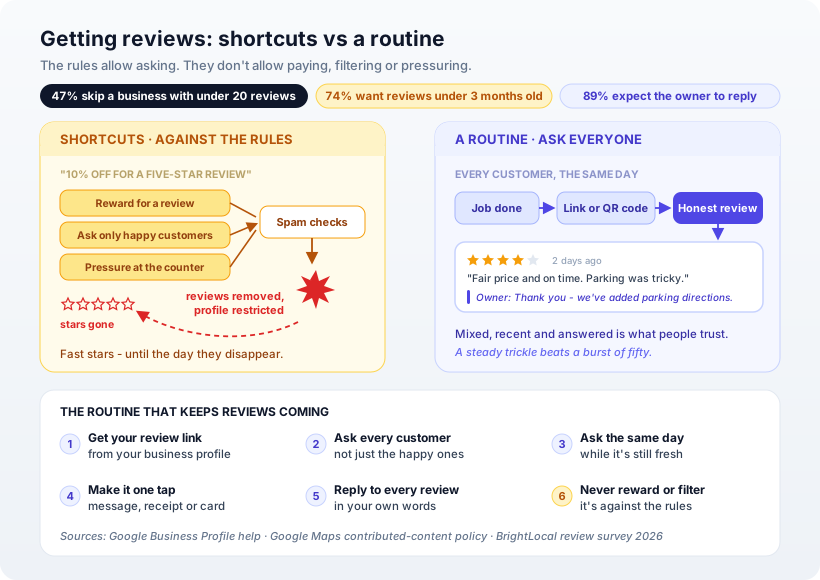
The way to get more Google reviews is to ask every customer, on the day you served them, with a link that opens the review box in one tap - and then reply to each review yourself. That is all Google allows, and it is enough. What it bans is the shortcuts: rewards for reviews, asking only the customers you know are happy, and pressuring people while they are still at the counter. Most businesses with few reviews don't have unhappy customers. They have customers nobody asked.
Why the count, the date and the reply all matter
BrightLocal's 2026 Local Consumer Review Survey asked 1,002 US consumers how they use reviews (BrightLocal). Three findings should shape how a small business thinks about this:
- Volume. 47% said they would not use a business with fewer than 20 reviews.
- Recency. 74% want to see reviews from the last three months. A pile of good reviews from two years ago counts for little.
- Replies. 89% expect the owner to respond, and 42% said they are unlikely to use a business that never does.
Star rating matters too - 68% want at least four stars - but notice what the survey says makes a review believable. The top factor, chosen by 56%, was consistent sentiment across many reviews. Long, glowing essays came last. People are not looking for perfection. They are looking for a pattern.
That changes the goal. You don't need fifty reviews by Friday. You need two or three new ones every month, indefinitely.
What Google allows, and what it bans
Asking is fine. Google's own help page tells businesses to "remind customers to leave reviews" and says customers can "visit a Google link or scan a QR code" to do it (Google Business Profile help).
The same page is blunt about the line. Reviews "must reflect a genuine experience", and "offering incentives, like free or discounted goods or services, in exchange for customers to post reviews, change reviews, or remove negative reviews" is treated as fake and misleading content and "strictly prohibited".
Google's content policy for Maps adds two rules that catch well-meaning owners (Google Maps contributed-content policy). Businesses may not:
- "Discourage or prohibit negative reviews, or selectively solicit positive reviews from customers." This is the practice often called review gating: asking "how was it?" first, and only sending the review link to people who say "great".
- "Require or pressure users to leave ratings or write reviews while on the premises." Handing someone a tablet and waiting is out. A card they take home is fine.
Paid-for reviews count as fake engagement, which the policy says "is not allowed and will be removed".
The rule is simple enough to fit on a sticky note: ask everyone, reward no one, and let them answer in their own time.
The rules are widely ignored. In the same BrightLocal survey, 59% of consumers said a business had offered them a reward before they reviewed. That is not a reason to join in. It is a reason the platforms keep tightening the filters, and a business that built its rating honestly keeps it when the others lose theirs.
The routine
1. Get your review link. Your business profile has an option to ask for reviews, which gives you a short link and a QR code. Save both. Everything else depends on this being one tap for the customer.
2. Ask every customer. Not the ones you think enjoyed it - everyone. This is what the policy requires, and it also produces the mixed, believable set of reviews that people trust.
3. Ask the same day. The best moment is right after the job is finished or the order is delivered, while the experience is fresh. A week later, most people have moved on.
4. Make it one tap. Send the link in the same message thread you already use with the customer, print the QR code on the receipt or invoice, or put it on a small card in the bag. Add one line saying what you'd like: "It takes a minute and helps other families find us."
5. Reply to every review, in your own words. Thank people by name and mention something specific. Half of the consumers surveyed said they'd be unlikely to choose a business that replies with generic, templated text. Google's guidance is to keep replies polite, avoid using them for promotions, and never share a reviewer's private details.
6. Treat a bad review as a second chance. Google's own help page says negative reviews "aren't necessarily a sign of poor business practices". Reply calmly, say what you've changed, and offer a way to contact you directly. The next reader is judging your reply, not the complaint.
A worked example: a home bakery delivers a custom eggless cake on Saturday afternoon. That evening the baker sends one message - "Hope the party went well! If you have a minute, a review here helps us a lot" - with the link. If even a few customers in ten follow through, that is a steady flow of new reviews every month, with no reward and no filtering.
Our opinion
Most review advice focuses on getting more. We think the reply is the underused half. A four-star review that says "parking was tricky", followed by an owner's reply that says "thank you - we've added directions to the car park behind the shop", sells better than five stars and silence. It shows a real person runs the place and listens.
We'd also stop worrying about the occasional three-star review. A wall of identical five-star reviews looks manufactured, and customers have learned to notice.
Where your website comes in
In the BrightLocal survey, 54% of consumers said that after reading positive reviews, their next step is to visit the business's website - up from 32% in 2019. Reviews create the interest; the site is where the customer checks the price and books. If that page is slow or has no prices, the review did its job and the visit is wasted. We made the longer case in does a small business need a website?, and reviews work alongside the other trust signal we covered in how a small business earns backlinks.
How Ashvara helps
We build small-business sites through our web development practice that put real reviews, prices and the booking button on the first screen, and we can add the review link and QR code to your receipts, confirmation emails and thank-you page so asking happens automatically. See how that looks in the demo sites for 16 kinds of business, or tell us about your business and we'll suggest where the ask fits best.
Sources: Google Business Profile help - tips to get more reviews · Google Maps user-contributed content policy · BrightLocal Local Consumer Review Survey 2026