INP is the metric that catches you: designing for response
INP is the most-failed Core Web Vital - 43% of sites miss it. It measures response after a tap, not load, so a fast page can still fail. Here's the fix.
6 min read
Interaction to Next Paint is the Core Web Vital most sites fail, and the reason is that it measures something your load-time metrics don't: how long the page makes a user wait after they tap, click, or type. A page can score beautifully on load and still stutter on every interaction - and INP is the metric that exposes it. As of 2026, 43% of sites fail the 200ms INP threshold, making it the most commonly failed of the three vitals. The fix isn't a faster server or a smaller image; it's almost always JavaScript - specifically, getting heavy work off the main thread so the browser can paint the result of an interaction quickly. If you optimized for LCP and assumed you were done, INP is where the surprise lives.
Why this matters now
INP became a Core Web Vital in March 2024, replacing the older responsiveness metric, and by 2026 it's the clear weak point across the web. To pass, a site needs INP under 200ms at the 75th percentile of real Chrome users over a 28-day window - meaning 75% of user interactions must resolve in under 200ms (web.dev). Roughly 43% of sites still fail that bar, and INP is now the most-failed Core Web Vital of the three.
That matters beyond the SEO signal. INP is a direct proxy for how responsive an app feels - the lag between a user acting and the interface reacting. A high INP is the technical fingerprint of an interface that feels sluggish, and sluggish interfaces lose users regardless of what Google thinks.
The mechanism: INP times the whole interaction
Here's why INP catches sites that LCP passes. INP measures the full lifecycle of an interaction - from the moment a user clicks, taps, or presses a key to the moment the browser paints the visual result - and it breaks into three parts.
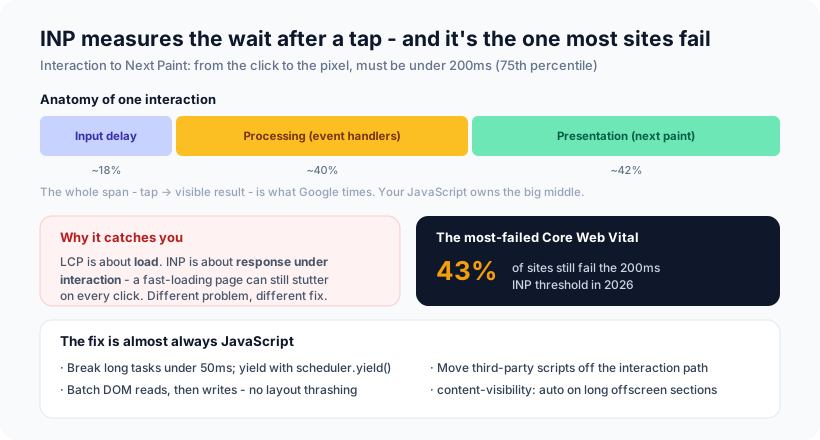
- Input delay (~18%) - time the interaction waits before its handler can even start, usually because the main thread is busy with something else.
- Processing time (~40%) - time spent running your event handlers.
- Presentation delay (~42%) - time from the handler finishing to the next frame being painted.
The pattern the breakdown reveals: the browser is mostly stuck waiting on the main thread. When a long task is running - a heavy handler, a client-side filter, a big DOM update, a third-party script - the interaction can't be processed and the frame can't be painted until it's done. LCP measures how fast content loads; INP measures how fast the page responds while the user is using it. Those are different problems with different fixes, which is exactly why a fast-loading page can still fail INP.
LCP is a photo of the page arriving. INP is a video of the page being used. You can ace the photo and still be janky in the video - and users live in the video.
How to actually fix it
INP problems are main-thread problems, and the fixes are concrete:
- Break up long tasks. Any task over 50ms blocks interactions. Split heavy work into chunks and yield control back to the browser with
await scheduler.yield()(or manual chunking) so a pending tap can be handled between chunks. - Get expensive synchronous work off the interaction path. Complex form validation, client-side filtering, and large DOM mutations triggered by a click are the single biggest contributor to poor INP. Defer, debounce, or move them.
- Stop layout thrashing in handlers. Never alternate read-DOM → write-DOM → read-DOM in one callback; batch all reads, then all writes, so the browser does one layout pass instead of three.
- Audit third-party scripts. Scripts that attach synchronous listeners or block the main thread during an interaction are the second-biggest cause. Load them off the critical path.
- Use
content-visibility: autoon long offscreen sections to skip layout and paint for what isn't visible - it can shave 50-100ms off interactions on long pages.
One measurement note that trips teams up: INP is scored on field data (real users, via the Chrome UX Report), not lab scores. A perfect Lighthouse run doesn't mean you pass; you have to look at what real users experience over the 28-day window.
Our opinion
Our take: treat INP as a design constraint, not a post-launch cleanup. The teams that pass it are the ones who decided early that interactions must stay snappy and architected accordingly - keeping the main thread free, doing heavy work off it, and shipping a leaner DOM. The teams that fail are usually the ones who optimized load time, saw green LCP, and never measured what happens when a user actually clicks. INP is where a heavy client-side architecture sends its bill.
We'd also argue INP is the honest performance metric for modern, interaction-heavy apps. A dashboard, a filterable list, a rich editor - these live or die on responsiveness, and INP finally measures the thing users actually feel. Chasing it isn't gaming a Google metric; it's building an interface that doesn't make people wait. That's the same principle behind what actually makes a website fast: speed the user can feel, not just a number in a lab report.
How Ashvara helps
We build fast web apps, and INP is squarely the kind of performance work we do: profiling real interactions, breaking up the long tasks that block them, moving heavy work and third-party scripts off the main thread, and keeping the DOM lean so every click stays under budget. The result is an app that feels instant to use - which is what INP measures and what users reward.
If your site loads fast but feels sluggish to use, or you want it built responsive from the start, that's our web development work. Talk to us and we'll make it fast where it counts - under the user's finger.
Source: web.dev - Interaction to Next Paint becomes a Core Web Vital (INP under 200ms at the 75th percentile); 2026 Core Web Vitals analyses (43% of sites fail INP; processing ~40% and presentation ~42% of the interaction).