Accessibility is the law now: the EAA and your product
The European Accessibility Act is in force, yet 94.8% of top homepages fail WCAG. Here's what the law requires and the six fixes that clear most of the gap.
5 min read
Web accessibility stopped being a nice-to-have and became a legal requirement in 2026 - the European Accessibility Act is now in force, it mandates WCAG 2.1 AA for digital products and services sold into the EU, and the vast majority of the web is not compliant. The scale of the gap is the story: WebAIM's 2025 audit of the top million home pages found 94.8% had detectable WCAG failures. If you sell into the EU, that's now a compliance exposure, not just a UX shortcoming. The good news, which most coverage buries, is that the fixes are concentrated - a handful of error types account for almost all the failures, so getting compliant is far more tractable than the headline number suggests.
Why this matters now
The regulatory clock already struck. The European Accessibility Act has been in force since 28 June 2025, and its harmonized standard (EN 301 549) incorporates WCAG 2.1 Level AA in full. It covers a broad range of products and services offered in the EU - e-commerce, banking, transport, e-books, and more - regardless of where the company is based. Enforcement varies by member state, but penalties are real: Germany allows up to €100,000 per violation, other states levy fines scaling into the hundreds of thousands or a share of annual revenue, and non-compliant products can be pulled from the market.
Against that backdrop, the WebAIM Million 2025 report is sobering. Across the top one million home pages it detected 50,960,288 accessibility errors - an average of 51 per page - and found 94.8% of pages had WCAG failures. Page complexity keeps rising (an average of 1,257 elements per home page), which tends to add more places for accessibility to break, not fewer.
The gap is real - but it's concentrated
Here's the part that turns a scary statistic into an actionable plan. WebAIM found that 96% of all detected errors fall into just six categories, and they've been the same six for five years running:
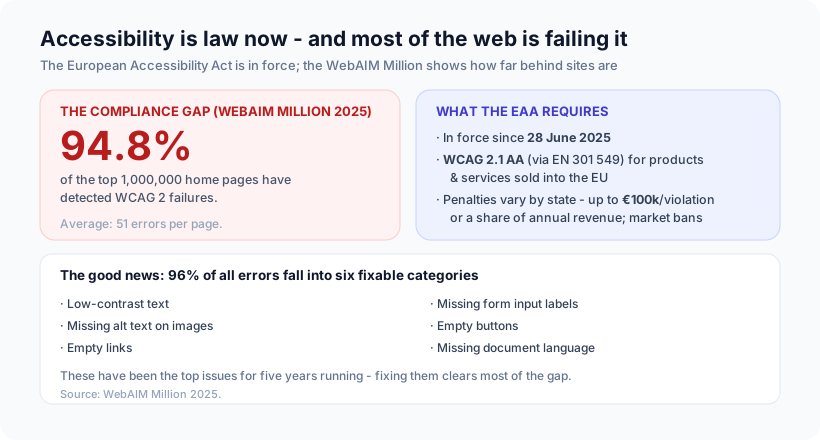
- Low-contrast text - the single most common failure
- Missing alternative text on images
- Empty links (a link with no discernible text)
- Missing form input labels
- Empty buttons
- Missing document language (
<html lang>not set)
The implication is genuinely encouraging: you don't need a heroic, ground-up rebuild to clear most of your exposure. Fixing these six categories addresses the overwhelming majority of failures - and none of them is technically hard. Alt text, form labels, a lang attribute, and adequate contrast are mechanical fixes, not architectural ones.
The scary number is "94.8% of sites fail." The useful number is "96% of failures are six fixable things." The distance between those two numbers is where a realistic compliance plan lives.
How to actually approach it
A pragmatic path, in order:
- Automated scan first. Tools that check against WCAG catch the mechanical majority - contrast, missing alt, unlabeled inputs - which is exactly where the bulk of errors live. This gets you most of the way cheaply.
- Manual testing for what tools can't see. Automated checks catch roughly a third of issues; keyboard navigation, screen-reader flows, focus order, and meaningful alt text (not just present alt text) need a human. Test the real journeys - sign-up, checkout, core task.
- Build it into the design system. The durable fix isn't a one-time audit; it's baking accessible components (labeled inputs, contrast-checked tokens, focus styles) into the system so new features are accessible by default. That's how you stop the gap from reopening.
- Publish an accessibility statement. Several member states require one, and its absence is itself a finding in some jurisdictions.
Our opinion
Our take: treat the EAA as the forcing function to do what good product teams should already do - and build accessibility into the system, not bolt it on before an audit. Overlay widgets and last-minute remediation tend to paper over the problem while leaving the real experience broken for the people who depend on assistive tech. The teams who come out ahead are the ones who fix the six common failures at the component level, so every screen inherits it.
And we'd reframe the whole thing away from fear. Accessibility is legibility, keyboard support, honest labels, and adequate contrast - which is just good interface design that happens to also be law now. A product that works with a screen reader and a keyboard is usually a clearer, faster, more robust product for everyone. This is the same user-first principle behind everything we build, from Liquid Glass done accessibly to interfaces that hold up under real conditions.
How Ashvara helps
We build web apps with accessibility designed in, not retrofitted: WCAG 2.1 AA components, contrast-checked design tokens, real keyboard and screen-reader testing on the core journeys, and an accessibility statement to match. If you sell into the EU, we can get you from "94.8% of sites fail" to compliant without a ground-up rebuild - by fixing the concentrated few things that actually matter and hardening your design system so it stays fixed.
If the EAA put accessibility on your roadmap - or you just want a product that works for everyone - that's our web development work. Talk to us and we'll help you close the gap the practical way.
Sources: WebAIM Million 2025 report (94.8% of home pages have WCAG failures; 96% of errors in six categories); European Accessibility Act compliance overview (in force 28 June 2025, WCAG 2.1 AA via EN 301 549).