iOS 27: one Swift API for the on-device model, Apple's cloud model, or yours
In iOS 27 a Foundation Models session can run on device, on Private Cloud Compute or on any model you plug in. How to choose per request, with the code.
8 min read
In iOS 27, the Foundation Models framework stopped being tied to one model. The same LanguageModelSession code can now run on the 4,096-token on-device model, on Apple's larger server model through Private Cloud Compute with a 32K-token window, or on any model that adopts the new LanguageModel protocol. Apple describes switching as "a single line of code". That makes the choice of model something your app decides for each request. Our default: start on device, measure the request with tokenCount, and move to the cloud only when it won't fit.
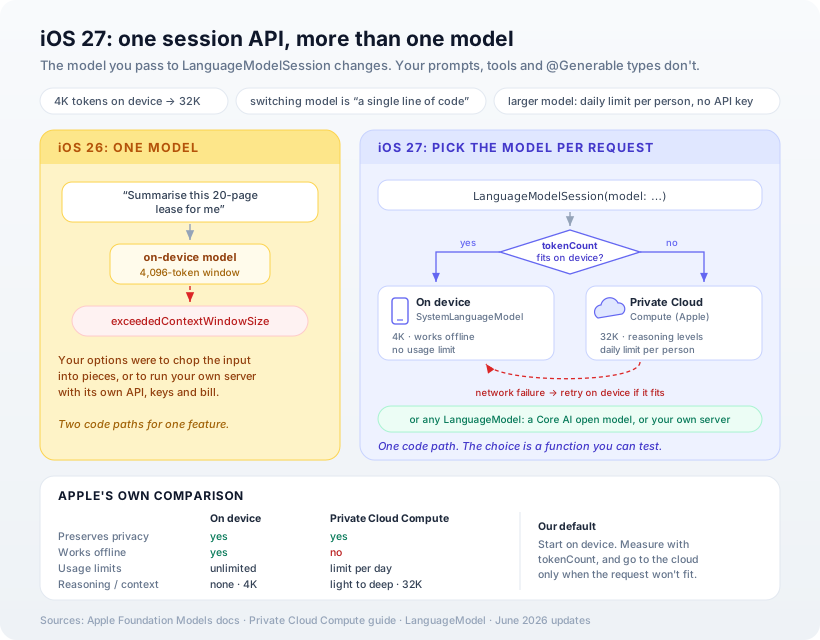
This continues our Swift series: we built a feature on the on-device model, added semantic search and gave it tools. All three were limited by the same thing, the 4,096-token window. iOS 27 is the first release where a request that doesn't fit has somewhere else to go without a second code path.
What changed, from Apple's own documentation
Apple's June 2026 Foundation Models update notes list the changes. Three matter most for app developers:
- Any model can sit behind a session. "Adopt the LanguageModel protocol to use any large language model — server or on-device — with the Foundation Models framework."
- Apple's server model is one line away.
PrivateCloudComputeLanguageModelgives "more reasoning capabilities and a larger context size." - A new on-device model. It "follows instructions more accurately", and because it changes when people update, Apple says to "test your prompts with the new model."
The Private Cloud Compute guide sets the two Apple models side by side:
| On-device model | Private Cloud Compute | |
|---|---|---|
| Preserves privacy | Yes | Yes |
| Works offline | Yes | No |
| Usage limits | Unlimited | Limit per day |
| Reasoning | Not supported | Multiple levels |
| Context size | 4K | 32K |
Two practical details from the same guide. There are no API keys: "You don't need to handle either when you use PCC." And the daily limit belongs to the person, not to your app: they "get a daily request limit" and can upgrade their iCloud+ plan for more. Using Private Cloud Compute also needs a managed entitlement that you request from Apple.
The routing function
Here's the decision as one function. It measures the request with tokenCount(for:) (available since iOS 26.4), keeps room for the answer, and only reaches for Private Cloud Compute when the on-device model can't hold the request:
import FoundationModels

struct TooLongForDevice: Error { let tokens: Int }

/// On device when the request fits; Private Cloud Compute when it doesn't.
@available(iOS 27.0, *)
func makeSession(for document: String, instructions: String) async throws -> LanguageModelSession {
    let onDevice = SystemLanguageModel.default
    let needed = try await onDevice.tokenCount(for: document)
        + onDevice.tokenCount(for: Instructions(instructions))
    let roomForAnswer = 800

    if needed + roomForAnswer <= onDevice.contextSize {
        return LanguageModelSession(model: onDevice, instructions: instructions)
    }
    let cloud = PrivateCloudComputeLanguageModel()
    if cloud.isAvailable && !cloud.quotaUsage.isLimitReached {
        return LanguageModelSession(model: cloud, instructions: instructions)
    }
    throw TooLongForDevice(tokens: needed)
}
Everything after this function is the same whichever model it picked: the same respond calls, the same tools, the same @Generable types. That's the real change. In iOS 26, "too long for the device" meant a separate integration with a separate server.
When the cloud fails
Private Cloud Compute needs a network connection, and it can say no. Its error type has three cases: quotaLimitReached, networkFailure and serviceUnavailable. Apple's advice for a network failure is to "retry the request using the on-device model". For a long document, that means splitting it up, which is exactly what you'd have had to do on iOS 26:
@available(iOS 27.0, *)
func summarise(_ document: String) async throws -> String {
    let instructions = "Summarise the document in five plain bullet points."
    let session = try await makeSession(for: document, instructions: instructions)
    do {
        return try await session.respond(to: document).content
    } catch let error as PrivateCloudComputeLanguageModel.Error {
        switch error {
        case .networkFailure, .serviceUnavailable:
            return try await summariseInParts(document)   // on device, in pieces
        case .quotaLimitReached:
            throw error                                    // show the quota UI
        @unknown default:
            throw error
        }
    }
}
The on-device fallback notes each part in its own fresh session, then summarises the notes. It uses only iOS 26 APIs:
/// On-device only: note each part in its own session, then summarise the notes.
func summariseInParts(_ document: String) async throws -> String {
    var notes: [String] = []
    for part in document.chunked(maxCharacters: 6_000) {
        let session = LanguageModelSession(instructions: "Note the key facts in this part of a document.")
        notes.append(try await session.respond(to: part).content)
    }
    let session = LanguageModelSession(instructions: "Summarise these notes in five plain bullet points.")
    return try await session.respond(to: notes.joined(separator: "\n")).content
}
chunked splits on paragraph breaks. Six thousand characters is roughly 1,500 tokens of English. For other languages, especially Chinese, Japanese and Korean where a token can be a single character, size the pieces with tokenCount instead.
For the quota case, Apple gives you the status rather than leaving you to guess. quotaUsage tells you whether the person is approaching or over their daily limit, and its limitIncreaseSuggestion can show the system's own upgrade options. Apple's guidance is to show that state in your UI, not in a dismissable alert. Xcode can also simulate "Approaching Quota Usage Limit" and "Quota Usage Limit Reached" from the scheme options, so the unhappy path can be tested before anyone hits it.
Bringing your own model
The LanguageModel protocol is what makes the third option possible. Apple's own example loads an open-source model exported with the new Core AI framework, and the session code doesn't change:
let model = try await CoreAILanguageModel(resourcesAt: modelURL)
let session = LanguageModelSession(model: model)
Apple names three reasons to use one: to get "specialized capabilities that the model provides", to "support a range of devices that might not support Apple Intelligence", and to "maintain cross-platform support". The second is the big one for us. Until now, every Apple Intelligence feature was simply missing on older iPhones. A small bundled model gives those people something, through the same code. Apple suggests a model of "around 0.6B parameters as a good first choice".
Our opinion
The headline isn't the bigger model. It's that the choice of model now lives in one function in your app. That function can be tested, logged and changed in an update, and that's what we'd build around.
We'd still default to the on-device model, for three reasons. It works offline, it has no usage limit, and the daily cloud limit is the person's to spend, not yours. An app that sends every request to the cloud uses up someone's allowance on work their phone could have done. Measure each request, use the cloud when the request needs it, and make sure the feature still does something useful when the cloud says no.
We'd also take the warning about the new on-device model seriously. Prompts tuned for one model can behave differently on the next, so keep prompts versioned and tested the way you'd test any dependency that changes underneath you.
One honest caveat: Xcode 27 requires an Apple silicon Mac, and our build Mac doesn't have one. The iOS 27 code here follows Apple's documented API exactly but hasn't been compiled by us yet. The on-device fallback (summariseInParts and chunked) does compile under Swift 6 against the iOS 26 SDK.
How Ashvara helps
We build iOS apps with AI features that work on any iPhone that can run them: on-device where possible, Apple's cloud model when the job needs it, and a sensible fallback when neither is available. We set up the routing, the quota UI and the tests for the unhappy paths.
That's the iOS development side of our AI solutions work. If you have an AI feature that's hitting the on-device limits, or one you held back because it wouldn't fit, tell us about it. iOS 27 may be what makes it work.
Sources: Apple Developer documentation, Foundation Models updates, Adding server-side intelligence with Private Cloud Compute, PrivateCloudComputeLanguageModel, LanguageModel and Running a Core AI model in a Foundation Models session.