Build an on-device AI feature in Swift: the code that actually ships
A working on-device AI feature in about 100 lines of Swift: the availability gate, fresh sessions, typed output, and the error handling tutorials skip.
10 min read
The call to Apple's on-device model is one line of Swift. Everything that decides whether your feature works on a real phone lives in the other hundred. Most tutorials show the one line. This post builds the whole thing: a feature that reads a private journal entry and returns a one-line summary, a mood, and a few tags, without the text ever leaving the device. Four decisions turn the demo into something you can ship, and each one is a few lines of code.
What we're building, and why on-device
We wrote before about why Apple's Foundation Models framework matters: a capable language model on the phone, with no API key, no network call and no per-request bill. This is the how.
The example is deliberately one where on-device isn't a nice-to-have. A journal entry is about the most private text a person writes. Sending it to a server to generate three tags would be an absurd trade, and on the phone the question simply doesn't arise.
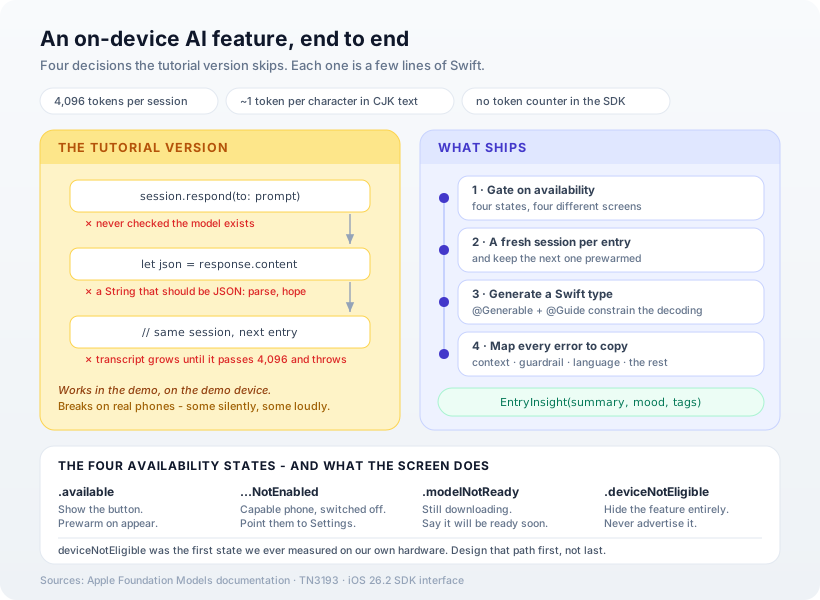
The feature takes an entry and produces a summary, a mood and up to four tags. Here are the four steps.
Step 1: Gate on availability — before anything else
The model isn't on every iPhone. It needs an Apple Intelligence device, the user has to have Apple Intelligence switched on, and the model has to have finished downloading. The framework reports all of that through one property, and each state deserves a different screen:
struct InsightButton: View {
    let entry: String
    let existingTags: [String]
    @State private var model = InsightModel()

    var body: some View {
        switch SystemLanguageModel.default.availability {
        case .available:
            Button("Summarise") {
                Task {
                    await model.analyse(entry,
                        existingTags: existingTags)
                }
            }
            .onAppear { model.warmUp() }
        case .unavailable(.appleIntelligenceNotEnabled):
            Text("Turn on Apple Intelligence in Settings.")
        case .unavailable(.modelNotReady):
            Text("Summaries will be ready shortly.")
        case .unavailable:
            EmptyView() // .deviceNotEligible: hide it
        }
    }
}
The last case is the one to think hardest about. On a phone that will never run the model, the right answer is to show nothing at all — no disabled button, no "upgrade your phone" nag. The feature should be a quiet bonus for people who have it, not a visible gap for people who don't.
We don't say this in the abstract. The first time we queried this property on our own test hardware, it returned .deviceNotEligible. Designing that path first isn't pessimism; it's the path we met first.
Step 2: Describe the answer as a Swift type
This is the part that makes on-device AI genuinely pleasant to build with. Instead of asking for JSON and parsing a string, you declare the shape you want:
import FoundationModels

@Generable
struct EntryInsight {
    @Guide(description: "One sentence, under 20 words")
    var summary: String

    @Guide(description: "The overall mood",
           .anyOf(["calm", "happy", "grateful",
                   "anxious", "sad", "frustrated", "mixed"]))
    var mood: String

    @Guide(description: "Short lowercase topic tags",
           .maximumCount(4))
    var tags: [String]
}
@Generable turns the struct into a schema, and the framework constrains the model's decoding to it. The model cannot return a mood outside that list or a fifth tag — it isn't validated afterwards, it's impossible to generate. We've argued before that schema-enforced output beats prompting for JSON; here it's built into the language, and what comes back is a typed Swift value.
The @Guide constraints are worth using aggressively. Every one you add is a class of bad output you never have to handle.
Step 3: A fresh session for every entry
Here's the mistake that isn't in any tutorial, and that the compiler can't catch. A LanguageModelSession is a conversation: every call appends to its transcript. Reuse one session across journal entries and the fifth entry is quietly carrying the first four. Apple's own guidance is explicit:
For a single-turn interaction, create a new session each time you call the model.
So each entry gets a fresh session — and because creating one has a cost, we keep the next one prewarmed:
@MainActor @Observable
final class InsightModel {
    enum State {
        case idle, working
        case done(EntryInsight), failed(String)
    }
    var state: State = .idle

    // One conversation per entry; next one prewarmed.
    @ObservationIgnored
    private var next = InsightModel.makeSession()

    private static func makeSession() -> LanguageModelSession {
        LanguageModelSession {
            "You tag private journal entries."
            "Reuse the user's existing tags when one fits."
        }
    }

    func warmUp() { next.prewarm() }
The instruction about existing tags matters more than it looks: without it, a model will happily file one entry under "work" and the next under "job", and the user's tag list slowly fills with near-duplicates. For a list of a few dozen tags, putting them straight in the prompt is simpler than wiring up a tool — save tools for data too large to paste.
Step 4: Budget the context window — without a counter
Apple's on-device model has, in the words of its own technical note, "a context window of 4096 tokens per language model session." That covers your instructions, the schema, the prompt and the answer.
Two things make budgeting awkward. First, the iOS 26.2 SDK exposes no API for counting tokens — we searched the framework's public interface to be sure. You find out you've overflowed when it throws. Second, the same note says a token is roughly three to four characters in English, but closer to one token per character in Chinese, Japanese and Korean. A character budget that's comfortable in English can overflow the window in Japanese.
So budget by characters, conservatively, and treat the error as expected rather than exceptional:
    func analyse(_ entry: String,
                 existingTags: [String]) async {
        // ~1,000 tokens of English. CJK is ~1 token
        // per character, so the catch still matters.
        let text = String(entry.prefix(4_000))
        let session = next
        next = Self.makeSession()
        state = .working

        do {
            let response = try await session.respond(
                to: """
                Existing tags: \
                \(existingTags.joined(separator: ", "))

                Entry:
                \(text)
                """,
                generating: EntryInsight.self,
                options: GenerationOptions(sampling: .greedy)
            )
            state = .done(response.content)
Greedy sampling is a small choice with a visible effect: the same entry produces the same tags every time. For a feature that files things, stability beats variety.
For text that genuinely won't fit — a long document rather than a journal entry — the technical note's advice is to split it, summarise each chunk in its own session, and combine the results.
Step 5: Give every error somewhere to go
The framework reports failures as specific cases, and each one needs copy a person can act on:
        } catch let error
            as LanguageModelSession.GenerationError {
            switch error {
            case .exceededContextWindowSize:
                state = .failed(
                    "This entry is too long to summarise.")
            case .guardrailViolation, .refusal:
                state = .failed(
                    "This entry can't be summarised.")
            case .unsupportedLanguageOrLocale:
                state = .failed(
                    "Not available in this language yet.")
            default:
                state = .failed("Couldn't summarise. Try again.")
            }
        } catch {
            state = .failed("Couldn't summarise. Try again.")
        }
    }
}
The guardrail case deserves particular thought in a journaling app, because the model's safety guardrails scan for exactly the subjects people write about on their worst days. The framework offers two guardrail settings — the default and a more permissive one for transforming content — and no off switch. Your copy for that case should be gentle, never accusatory, and should never imply the person wrote something wrong.
Bonus: stream the answer as it forms
For anything longer than a tag list, streaming makes the feature feel immediate. Every @Generable type gets a PartiallyGenerated twin whose fields are all optional, filling in as the model produces them:
func streamInsight(
    _ entry: String,
    into update: @escaping
        (EntryInsight.PartiallyGenerated) -> Void
) async throws {
    let session = LanguageModelSession()
    let stream = session.streamResponse(
        to: entry, generating: EntryInsight.self)
    for try await snapshot in stream {
        update(snapshot.content)
    }
}
What we verified, and what we didn't
We want to be exact about this, because a code post is only as good as its code.
Stitch the snippets above together in order and you get a 118-line file that typechecks cleanly under Swift 6 strict concurrency against the iOS 26.2 SDK — we compiled exactly the code on this page, not a tidier private version of it. The compiler earned its keep, too: our first draft used a lazy session inside an @Observable class, which doesn't compile, and we only caught the shared-session transcript problem by rereading Apple's guidance afterwards.
What we did not do is run it on a phone and time it — our development hardware reports .deviceNotEligible, the same state Step 1 hides from users. So there are no latency figures in this post. We'd rather give you none than invent them.
Our opinion
On-device AI is a progressive enhancement, not a feature you promise. Build it the way you'd build any capability some devices lack: the unavailable path first, the happy path second, and marketing that never assumes the model is there. Teams that do it the other way round end up with a feature that's the headline on their App Store page and invisible on half their users' phones.
The second lesson is quieter: read what each model variant is for. We started this example on the framework's content-tagging model because it sounded like a perfect fit — and then read that it "always responds with tags." Asking it for a one-sentence summary as well would have been fighting the tool. The general model does all three jobs; the tagging variant is for when tags are the only job.
And the third, which is why we think this is worth the effort at all: for private data, this architecture doesn't mitigate the privacy question — it deletes it. There is no server to secure, no data-processing agreement to sign and no breach to disclose, because the text never went anywhere. That's a structural advantage no amount of policy can match, and it's the reason we keep reaching for it in apps where the data is personal.
How Ashvara helps
We build iOS apps where the AI runs on the phone: typed outputs, a graceful story for every device that can't run the model, and error copy written for the moment it actually appears. It's a meaningful part of our iOS development work, and it pairs with how we approach AI features generally.
If you have a feature idea involving sensitive data and you've assumed it needs a server, tell us what you're building. There's a good chance it doesn't.
Sources: Apple Developer documentation — Generating content and performing tasks with Foundation Models, TN3193: Managing the on-device foundation model's context window, and SystemLanguageModel.UseCase.contentTagging; the FoundationModels public interface in the iOS 26.2 SDK. Code typechecked, not device-tested — see above.