Build on-device semantic search in Swift, and measure it
Search that finds 'paneer and spinach' when someone types 'groceries', in about 70 lines of Swift, on the phone - with the numbers from testing it.
11 min read
Someone types "groceries" into your app's search and finds the note that says "pick up paneer, spinach and tomatoes". No server, no API key, no data leaving the phone: about 70 lines of Swift on a framework Apple has shipped since iOS 14. We built it, then tested it against a set of notes with known right answers, because "semantic search" demos always pick the query that works. The measurements changed the design twice — and the version that actually works best isn't pure meaning-based search at all.
How we tested it
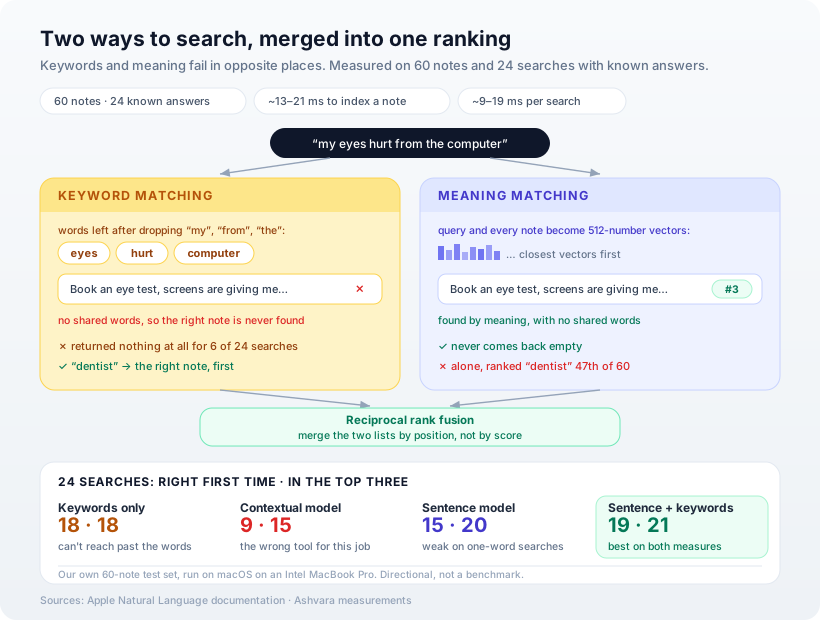
A search demo with one hand-picked query proves nothing, so we wrote a small test set first: 60 realistic personal notes and 24 searches, each with one known right answer. Eleven searches share a word with their target ("dentist", "printer ink"). Thirteen deliberately don't ("wifi is unreliable" should find "the internet keeps dropping").
For each approach we counted two things: how often the right note came first, and how often it landed in the top three — the realistic bar for a search list on a phone.
Two caveats, stated up front rather than buried. We wrote the set ourselves, so treat the numbers as directional — 24 queries is enough to see which approach is broken, not to rank close contenders precisely. And timings come from an Intel MacBook Pro running the same framework on macOS, not an iPhone; we cover what that means at the end.
Step 1: Pick the model Apple built for this job
The Natural Language framework offers two ways to turn text into vectors, and the newer one sounds better. NLContextualEmbedding arrived in iOS 17 and adjusts each word's meaning based on the words around it. We started there.
It was the worst of everything we measured: 9 of 24 right first time, versus 18 for plain keyword matching — and 200–300 ms per note to compute, versus roughly 13–21 ms for the alternative. Reading the documentation properly explained why. The contextual model produces a vector per word for building your own classifiers, and Apple's page says it directly:
For semantic similarity tasks, consider using NLEmbedding.
So we switched to the sentence embedding, which produces one vector for a whole piece of text. It's older, it's simpler, and it's the right tool:
import NaturalLanguage

/// One vector per sentence, from the model
/// Apple ships for similarity.
struct Embedder {
    private let model: NLEmbedding

    init?(language: NLLanguage = .english) {
        guard let m = NLEmbedding
            .sentenceEmbedding(for: language)
        else { return nil }
        model = m
    }

    func vector(for text: String) -> [Double]? {
        model.vector(for: text).map(normalised)
    }
}

func normalised(_ v: [Double]) -> [Double] {
    let n = v.reduce(0) { $0 + $1 * $1 }.squareRoot()
    return n > 0 ? v.map { $0 / n } : v
}

func dot(_ a: [Double], _ b: [Double]) -> Double {
    zip(a, b).reduce(0) { $0 + $1.0 * $1.1 }
}
Normalising every vector to length one means similarity is just a dot product — no division per comparison, which matters when you're comparing a query against every note.
Step 2: Build the index once, search it many times
Each note becomes a 512-number vector when it's saved. A search embeds the query, compares it against every stored vector, and sorts:
struct SemanticIndex {
    private(set) var items:
        [(id: Int, text: String, vector: [Double])] = []
    let embedder: Embedder

    mutating func add(id: Int, text: String) {
        if let v = embedder.vector(for: text) {
            items.append((id, text, v))
        }
    }

    func search(_ query: String, limit: Int = 5)
        -> [(id: Int, score: Double)] {
        guard let q = embedder.vector(for: query)
        else { return [] }
        return items
            .map { ($0.id, dot(q, $0.vector)) }
            .sorted { $0.1 > $1.1 }
            .prefix(limit)
            .map { (id: $0.0, score: $0.1) }
    }
}
On its own, this got 15 of 24 right first time and 20 of 24 into the top three. It found "groceries for tonight's dinner" and "who owes me money" with no shared words at all.
Comparing against every note is a linear scan, and that's deliberate. For the few thousand items a personal app holds, it's milliseconds, and it needs no index structure to maintain. Persist the vectors alongside each note so you never recompute them on launch.
Step 3: Put keywords back
Then we looked at what meaning-based search got wrong, and one result stood out: for the one-word search "dentist", it ranked the dentist appointment 47th out of 60.
A single word gives a sentence model almost nothing to work with. Plain keyword matching gets that one trivially right — it's the thing keywords are best at. And keywords had the opposite failure: for 6 of the 24 searches, keyword matching returned nothing at all, because the words simply weren't there.
Each approach fails exactly where the other succeeds. So we use both:
/// Common words that match everything
/// and mean nothing.
let stopwords: Set<String> = ["the", "and", "for",
    "from", "with", "that", "this", "are", "was",
    "but", "not", "you", "your", "our", "has",
    "have", "about", "into", "after", "before",
    "then", "than", "all", "any", "can"]

/// Words matter too: a tiny keyword scorer
/// to blend with meaning.
func keywordScores(_ query: String,
                   _ texts: [String]) -> [Double] {
    let words = { (s: String) in
        Set(s.lowercased()
            .split { !$0.isLetter && !$0.isNumber }
            .map(String.init)
            .filter { $0.count > 2
                && !stopwords.contains($0) })
    }
    let q = words(query)
    return texts.map {
        Double(q.intersection(words($0)).count)
    }
}
The stopword list is there because of a bug we found in testing, and it's worth describing. Without it, the search "my eyes hurt from the computer" matched a note about photos "from the Kerala trip" — and that one meaningless match pushed the right answer, which meaning-based search had placed third, all the way down to 46th. Common words match everything, so they have to be ignored. In fairness: we added this list after seeing that failure, so it's a change made with knowledge of the test set — though the words in it are the ordinary ones any search engine ignores.
Step 4: Merge the two rankings by position, not score
A keyword count and a cosine similarity aren't on the same scale, so you can't simply add them. Reciprocal rank fusion sidesteps that by ignoring scores entirely and merging the two lists by position: an item ranked highly by either list rises, and an item ranked highly by both rises furthest.
/// Reciprocal rank fusion: merge two rankings
/// without comparing their scores.
func fuse(_ a: [Int], _ b: [Int],
          k: Double = 60) -> [Int] {
    var score: [Int: Double] = [:]
    for (rank, id) in a.enumerated() {
        score[id, default: 0] += 1 / (k + Double(rank + 1))
    }
    for (rank, id) in b.enumerated() {
        score[id, default: 0] += 1 / (k + Double(rank + 1))
    }
    return score.sorted { $0.value > $1.value }
        .map(\.key)
}
The constant 60 comes from the original technique and dampens the influence of any single top position. We didn't tune it, and on a test set this small we deliberately wouldn't.
The results
| Approach | Right first time | In top three | Time per note |
|---|---|---|---|
| Keywords only | 18 / 24 | 18 / 24 | — |
| Contextual embedding (wrong tool) | 9 / 24 | 15 / 24 | 200–300 ms |
| Sentence embedding | 15 / 24 | 20 / 24 | 13–21 ms |
| Sentence embedding + keywords | 19 / 24 | 21 / 24 | 13–21 ms |
The hybrid beats both of its parts on both measures. It got all 11 keyword-style searches right first time, and it never came back empty.
Two things in that table deserve a second look. Keywords alone score well on "first time" — partly because we wrote eleven searches that share a word with their answer — but they can't improve on that at all in the top three, because when the words aren't there, there's nothing to rank. And the hybrid's real gain isn't the four extra first-place hits over the sentence model; it's that the failures stop being embarrassing. "Dentist" goes from 47th to 1st.
Where it still misses
Three searches never made the top three, and they're instructive. "Looking after the houseplants" placed the note about watering the balcony plants 18th. "Wifi is unreliable" placed the broadband note sixth; "festival food planning" placed the Diwali menu fifth.
These are the cases where the connection is real but indirect — houseplants to balcony plants, wifi to broadband — and a compact sentence model that ships inside the OS has limits on how much of that it knows. Three practical responses: show five results rather than one, so near-misses are still visible; keep the keyword half, which you now have anyway; and if your domain has its own vocabulary, add your own synonyms to the keyword side, which costs nothing and is fully under your control.
What we measured, and what we didn't
Every code block above was run, as published, to produce the table — stitched into one file and executed against the test set, not a tidier private version. That's also how we found the stopword bug.
The timings come from an Intel MacBook Pro running the same Natural Language framework on macOS: 13–21 ms to index a note and 9–19 ms per search over 60 notes across four runs, and under a second to load the model the first time. A recent iPhone's processor will likely be faster than this eight-year-old laptop chip, but we haven't measured it on a phone, so we won't put a phone number in print. The relative ordering — the contextual model at more than ten times the cost per note — is the part we'd expect to hold.
Our opinion
Meaning-based search is a complement to keyword search, not a replacement for it. The industry's default story is that embeddings superseded keywords. Our measurements say each fails exactly where the other works, and the best result came from combining them with a dozen lines of code. If you take one thing from this post, take that: ship the hybrid.
The second lesson repeats one from our last on-device build, which is a sign it's a real pattern rather than a coincidence: read what each API is for. The newer, more sophisticated model was the worst choice here, and the documentation said so in one sentence. Newer and better-sounding are not the same as right for the job.
And the reason to do this on the device at all is the same as always. Notes, journals, reminders and documents are personal. Search that runs on the phone never has to answer the question of where that text went, because it never went anywhere.
How Ashvara helps
We build search and AI features that run on the phone, and we measure them against real data before calling them done — the habit that turned up both bugs in this post. It's a meaningful part of our iOS development work and how we approach AI features generally.
If your app holds personal data and its search only matches exact words, tell us what people are looking for. The fix is probably smaller than you think.
Sources: Apple Developer documentation — NLContextualEmbedding, sentenceEmbedding(for:) and Finding similarities between pieces of text. Measurements: our own 60-note, 24-query test set, run on macOS on an Intel MacBook Pro; directional, not a benchmark.