Why your iOS app doesn't sync in the background
Scheduling a background task on iOS is a request, not a timer. iOS decides from usage history, battery and thermal state - and never tells you it said no.
9 min read
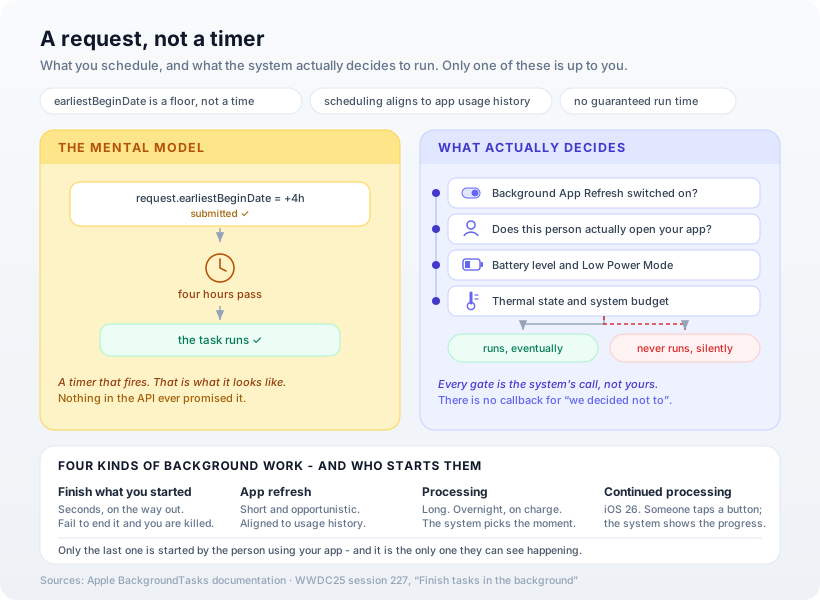
When you schedule a background task on iOS, you are not scheduling anything. You are filing a request that the system is free to defer indefinitely, and there is no callback for "we decided not to." This is the single most common source of "it works on my phone" bugs in iOS apps, and it isn't a bug in your code — it's the contract, working exactly as designed. Understanding why the system says no is the difference between a sync feature that mostly works and a product promise you can't keep.
The sentence that explains everything
Every developer who has fought this has written something like request.earliestBeginDate = Date(timeIntervalSinceNow: 4 * 3600) and then wondered why the task fired eleven hours later, or not at all. Apple's documentation for that exact property is completely unambiguous:
Setting the property indicates that the background task shouldn't start any earlier than this date. However, the system doesn't guarantee launching the task at the specified date, but only that it won't begin sooner.
Read it as what it is: a floor, not a schedule. You are declaring the earliest moment at which you'd accept being woken. Everything after that is the operating system's decision, made on behalf of the person holding the phone rather than on behalf of your app.
The same language runs through the rest of the framework. Apple describes app refresh as "a request to launch your app in the background to execute a short refresh task" — no duration promised. For heavier work, the guidance is that you "schedule these types of background tasks using [a processing request], and the system decides the best time to launch your background task."
Nowhere is there a guarantee. That is not an oversight.
Why it works on your device and fails on your user's
Here's the part that makes this so hard to catch before release. From Apple's WWDC session on background work:
The system aligns these tasks with app usage history. Frequently used apps have an increased chance of being scheduled.
Now consider whose device you tested on. You launch your app twenty times a day. You force-quit and relaunch it constantly. You keep it in the foreground while you watch the debugger. Your phone is the single most favourable environment your app will ever run in — you have accidentally trained the scheduler to treat your app as important.
Your actual user opens it on Sunday evenings. To the scheduler, that app is a low-priority candidate for background time, and it will be quietly starved. The feature isn't broken. It's being deprioritised, correctly, by a system optimising for a battery you don't own.
Stack the other gates on top:
- Background App Refresh can simply be off. It's a per-app toggle and a global one, and plenty of people turn it off deliberately to save battery. Your app gets nothing, forever, and never learns why.
- Low Power Mode is an explicit signal from the user that discretionary work should stop. Yours is discretionary.
- Thermal state and system budget apply across every app on the device. A hot phone on a summer afternoon isn't running your database maintenance.
None of these produce an error. There's no delegate method for refusal, no didDeclineToRun. The absence of a run is indistinguishable from a run that hasn't happened yet.
Four tiers, and who starts each one
The framework isn't one thing, and picking the wrong tier is the second most common mistake here.
| Tier | What it's for | Who decides when |
|---|---|---|
| Finish what you started | Completing a save or a send as the app leaves the foreground | You — but on a hard, short clock |
| App refresh | Fetching content shortly before the user is likely to open the app | The system, from usage history |
| Processing | Heavy work: model training, database maintenance, cleanup | The system, typically overnight on charge |
| Continued processing (iOS 26) | Long work the user explicitly asked for, with visible progress | The user starts it; the system supervises |
The first tier has a sharp edge worth spelling out, because it terminates apps in the wild. Apple: "The system grants your app a limited amount of time to perform its work once it enters the background. Don't exceed this time, and use the expiration handler to cover the case where the time has depleted." And then, bluntly: "The system terminates your app if you fail to call this method." Not "the task fails." The app is killed. Always implement the expiration handler, and always end the task.
The tier that changed the shape of the problem
iOS 26 added BGContinuedProcessingTask, and it's a genuinely different deal — the first background tier designed around the person rather than the scheduler. The constraint is the interesting part:
Continue processing tasks always start with an explicit action that someone performs in your app, like a button tap or gesture.
In exchange for that, the system shows progress in its own UI, the user can watch it and cancel it, and the work continues after they leave your app. The obvious use case is the one that's been awkward for a decade: the user taps Export, the job takes ninety seconds, and they switch to Messages halfway through.
Two rules come with it. First, you must actually report progress — "tasks that do not report any progress will be expired, allowing the system to reclaim and redistribute the resources." Second, don't get clever about the trigger: "if a task starts without an explicit action, people may not understand the goal of the task... doing this unexpected work may lead to your app's task being canceled."
There's also a submission strategy worth knowing: you can ask for the request to fail immediately rather than queue if it can't start right now, which gives you something honest to show the user instead of a spinner that may never resolve.
What to actually do
- Never design a feature whose correctness depends on background execution. Background refresh is an optimisation that makes your app feel fresh when it opens. If the product breaks when it doesn't run, the product is wrong.
- Do the same work on foreground launch. Cheap, reliable, and it means a starved scheduler costs latency rather than data.
- Use background URLSession for transfers. Downloads and uploads handed to the system survive suspension and even termination — a fundamentally stronger guarantee than being woken up to do the work yourself.
- Reschedule at the start of every run, not the end. If your task gets expired mid-flight, you've already queued the next one.
- If you need a specific moment, you need a push. A silent push is the only mechanism that lets your server decide when something happens. The scheduler will never be that.
- Make the work resumable and idempotent. Assume every run is a partial run that may be cut off, because some of them are.
- For long user-initiated jobs on iOS 26+, use continued processing — and give people the progress they were going to look for anyway.
Our opinion
The framing that fixes this for most teams is to stop calling it "background sync" and start calling it "opportunistic pre-warming." The name change does real work. Nobody promises a stakeholder that pre-warming happened; everybody assumes sync did. We've watched more than one roadmap commitment quietly rest on a scheduler that was never going to cooperate.
And we'd defend the design, firmly. It is genuinely tempting to read all of this as Apple being obstructive, but the alternative is a phone where a hundred apps each decided their own work was important enough to wake the device for. Every app author believes theirs is the exception. The scheduler's job is to disagree with all of them on the user's behalf, and the fact that it disagrees with us too is the feature working.
The practical consequence is architectural rather than clever: design so that missing a background window is invisible. That's a large part of why we lean local-first on iOS — when the data already lives on the device, a skipped refresh is a slightly stale timestamp instead of an empty screen.
How Ashvara helps
Across the apps we've shipped on the App Store, most of the ones with sync built it before knowing any of this, and rebuilt it after. We now design the background story up front: which tier each job belongs in, what happens when it never runs, and what the user sees in the meantime.
That's ordinary iOS development work for us — and the useful conversation usually happens at the feature-design stage, before anyone writes a scheduler call. If your app has a sync that works in testing and mysteriously doesn't for some users, tell us what you're seeing; the answer is usually in the four gates above.
Sources: Apple Developer documentation — BGTaskScheduler, earliestBeginDate, and Choosing background strategies for your app; WWDC25 session 227, Finish tasks in the background. Apple deliberately publishes no guaranteed durations or intervals for background execution — treat any specific number you read elsewhere as a measurement, not a contract.