Let the on-device model call your app's code: tool calling in Swift
Apple's on-device model can't see your users' data, but it can call your Swift to fetch it. The code, the schema it sees, and five rules for small models.
11 min read
Apple's on-device model knows nothing about the person holding the phone, so ask it "did I spend more on groceries this week?" and it will either refuse or make up a number. Tool calling fixes that: you hand the model a few small Swift functions, it decides which to call and with what arguments, and your code fetches the real figures. The model chooses; your code does the counting. It's about a hundred lines of Swift, and the parts that matter most are design decisions, not API calls.
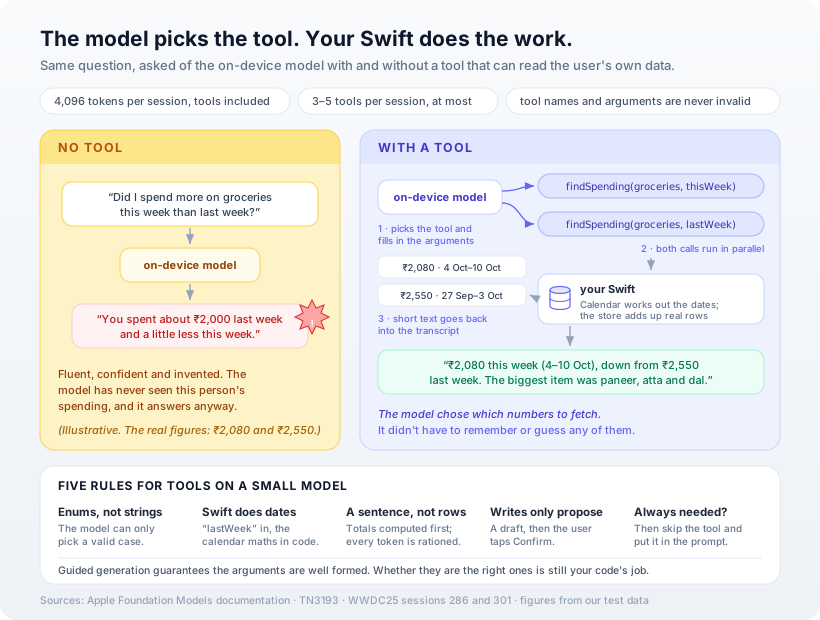
This is the third piece in a series. The first built a feature on Apple's Foundation Models framework, and the second added on-device search. Tool calling is the step that turns the model from a writer into something that can work with the user's own records.
What Apple actually promises
Apple's own description is short: tool calling "lets the model execute code you define in your app," and the model can "autonomously make decisions about what tool to use and when." Three details from the documentation shape everything else:
- Arguments can't be malformed. From the WWDC25 session: "tool calling is built on guided generation to ensure that the model will never produce invalid tool names or arguments." The model can only produce values your schema allows.
- Calls can run in parallel. "A tool can be called multiple times for a single request. And when that happens, your tool gets called in parallel." The
Toolprotocol requiresSendablefor exactly this reason. - Tools cost context. The model's window is 4,096 tokens per session, and Apple's context-window technote is explicit that "the information of tools (schemas, input, and output)" counts against it. Its advice is to keep each description "to a short phrase" and to give the model "a maximum of 3–5 tools."
That last point is what separates this from tool calling against a large cloud model. You are working inside a budget roughly the size of a long email, so every design choice below is about spending fewer tokens and giving the model fewer ways to be wrong.
The read tool
The example is a personal spending app. The data stays in whatever store the app already uses; here it's a small actor standing in for SwiftData.
@Generable
enum SpendingCategory: String {
    case groceries, dining, transport, home, all
}

@Generable
enum Period: String {
    case today, thisWeek, lastWeek, thisMonth, lastMonth

    /// The date maths lives here, in Swift, not in the model.
    func interval(around now: Date, calendar: Calendar = .current) -> DateInterval? {
        switch self {
        case .today:     calendar.dateInterval(of: .day, for: now)
        case .thisWeek:  calendar.dateInterval(of: .weekOfYear, for: now)
        case .lastWeek:  calendar.date(byAdding: .weekOfYear, value: -1, to: now)
                             .flatMap { calendar.dateInterval(of: .weekOfYear, for: $0) }
        case .thisMonth: calendar.dateInterval(of: .month, for: now)
        case .lastMonth: calendar.date(byAdding: .month, value: -1, to: now)
                             .flatMap { calendar.dateInterval(of: .month, for: $0) }
        }
    }
}

struct SpendingTool: Tool {
    let name = "findSpending"
    let description = "Totals the user's recorded spending for a category and period."

    @Generable
    struct Arguments {
        @Guide(description: "Spending category")
        var category: SpendingCategory
        @Guide(description: "Time period")
        var period: Period
    }

    let store: ExpenseStore
    var now: @Sendable () -> Date = { Date() }

    func call(arguments: Arguments) async throws -> String {
        guard let interval = arguments.period.interval(around: now()) else {
            return "Could not work out that period."
        }
        let rows = await store.expenses(in: interval, category: arguments.category)
        let range = interval.start.formatted(.dateTime.day().month())
            + "–" + interval.end.addingTimeInterval(-1).formatted(.dateTime.day().month())

        guard !rows.isEmpty else {
            return "No \(arguments.category.rawValue) spending recorded for \(range)."
        }
        let total = rows.reduce(Decimal.zero) { $0 + $1.amount }
        let largest = rows.sorted { $0.amount > $1.amount }.prefix(3)
            .map { "\($0.note) \(rupees($0.amount))" }
            .joined(separator: ", ")

        // Small, pre-digested output: every token here comes out of a 4,096-token window.
        return "\(arguments.category.rawValue), \(range): \(rows.count) expense\(rows.count == 1 ? "" : "s"), "
            + "total \(rupees(total)). Largest: \(largest)."
    }
}
The two @Generable enums are the most important decision in the file. This is the schema the framework actually generates from Arguments and shows the model (printed from tool.parameters, trimmed):
"category": { "enum": ["groceries", "dining", "transport", "home", "all"] },
"period":   { "enum": ["today", "thisWeek", "lastWeek", "thisMonth", "lastMonth"] }
With a closed list, the model can't ask for "the week before Diwali" or a date in the wrong format, because guided generation won't let it produce anything outside those values. It picks lastWeek, and Calendar turns that into real dates using the user's own locale and first day of the week. Small models are unreliable at date arithmetic. Swift isn't.
We ran the tool directly, without the model, against six test expenses with "today" set to Friday 9 October. This is the exact output the model would receive:
| Call | What the tool returned |
|---|---|
groceries, thisWeek | groceries, 4 Oct–10 Oct: 2 expenses, total ₹2,080. Largest: paneer, atta and dal ₹1,240, vegetables and fruit ₹840. |
groceries, lastWeek | groceries, 27 Sep–3 Oct: 2 expenses, total ₹2,550. Largest: monthly staples ₹2,100, milk and curd ₹450. |
groceries, today | No groceries spending recorded for 9 Oct–9 Oct. |
Each output is about forty words. It includes the resolved date range so the model can say "4–10 Oct" instead of guessing what "this week" meant, and it gives an explicit "nothing recorded" sentence rather than an empty string the model might fill in for itself.
The session
let session = LanguageModelSession(
    tools: [SpendingTool(store: store), DraftExpenseTool(pending: pending)],
    instructions: """
    You answer questions about the user's own spending, in rupees.
    Use findSpending for every figure. Never estimate an amount.
    """
)
do {
    return try await session.respond(to: question).content
} catch let error as LanguageModelSession.ToolCallError {
    throw AskError.failed("\(error.tool.name) failed: \(error.underlyingError)")
}
That's all the wiring there is. The framework calls your tools, adds their output to the transcript and continues generating; you never parse a tool call yourself. Tools "must be attached at session initialization," so choose the set for the screen, not for the whole app.
For tests and debugging, the transcript records every call the model made:
func toolCalls(in session: LanguageModelSession) -> [String] {
    session.transcript.flatMap { entry -> [String] in
        guard case .toolCalls(let calls) = entry else { return [] }
        return calls.map { "\($0.toolName) \($0.arguments.jsonString)" }
    }
}
Assert on this rather than on the model's wording. Wording varies from run to run. "Asked about this week versus last week, it called findSpending twice with thisWeek and lastWeek" is a stable, testable fact.
Tools that change things should only propose
The read tool is safe to let the model call freely. A tool that writes data is different, and the pattern we use is that the model can draft but only the user can commit:
struct DraftExpenseTool: Tool {
    let name = "draftExpense"
    let description = "Drafts a new expense for the user to confirm."

    @Generable
    struct Arguments {
        @Guide(description: "Amount in rupees", .range(1...500_000))
        var amount: Int
        var category: SpendingCategory
        @Guide(description: "A few words, e.g. 'vegetables at the market'")
        var note: String
    }

    let pending: PendingActions

    func call(arguments: Arguments) async throws -> String {
        guard arguments.category != .all else {
            return "Ask the user which category this expense belongs to."
        }
        await pending.propose(Expense(date: Date(), amount: Decimal(arguments.amount),
                                      category: arguments.category, note: arguments.note))
        return "Drafted. It is not saved until the user taps Confirm."
    }
}
The draft appears in your UI with a Confirm button, and nothing reaches the store until it's tapped. Note the .range guide on the amount and the guard on .all: guided generation guarantees an amount is a whole number within range, not that it's the right number, and the returned sentence tells the model what to say next. This is the same principle we argued for in agent guardrails: the rule lives in the tool, where the model can't talk its way past it.
Five rules for tools on a small model
- Use enums, not strings. A closed set of cases is the single best defence against bad arguments, and it costs fewer tokens than a long description of what's allowed.
- Keep the logic in Swift. Dates, currency, totals and sorting all happen in code. The model chooses which question to ask; it shouldn't be doing the arithmetic.
- Return a sentence, not rows. Two hundred raw expense rows would fill the window. A total and the three largest items fit in about forty words.
- Let write tools propose, not commit. Anything that changes data ends at a confirmation the person sees.
- If the model always needs the data, don't use a tool. Apple's technote says it directly: when "the model should always have information from a tool, run the tool directly before you call the model and integrate the tool's output to the prompt." A tool earns its place only when the model has to decide whether to call it.
One forward note: iOS 27 adds a tool calling mode that can require the model to call a tool before it answers, or forbid tools for a request. On iOS 26, the instruction "Use findSpending for every figure" is how you ask for that, and it's only a request.
Our opinion
Tool calling is what makes the on-device model useful for apps that hold personal data, which is most of them. Without tools it can only rewrite, summarise and classify whatever text you pass it. With two or three well-designed tools it can answer questions about the user's own records, and those records never leave the phone.
The work is mostly design, and that's where teams tend to go wrong. The usual instinct is to give the model a generic query(sql:) tool and let it work things out. On a model with a 4,096-token window, that is the wrong way round. Narrow tools with enum arguments and pre-computed output do better because they leave the model less to get wrong. We'd rather ship three small tools that work reliably than one flexible tool that works most of the time.
One honest caveat: the code here compiles under Swift 6 against the iOS 26 SDK, and we ran the tools themselves against test data. We didn't run the full model loop for this post, because Apple Intelligence needs Apple silicon and our build Mac doesn't have it. The two quoted answers in the diagram show what to expect; they aren't recorded model output.
How Ashvara helps
We build iOS apps where on-device AI is a feature that works with the user's own data, not a demo. We decide which questions need a tool, design the enums and outputs to fit the context window, and write tests against the transcript rather than the wording. Your users' data stays on their phones throughout.
That's the iOS development and AI solutions side of what we do, informed by the apps we've shipped to the App Store. If you have an app full of user data and want to know what the on-device model could do with it, tell us about it.
Sources: Apple Developer documentation, Expanding generation with tool calling, Tool and TN3193: Managing the on-device foundation model's context window; WWDC25 sessions 286, Meet the Foundation Models framework and 301, Deep dive into the Foundation Models framework. Tool outputs in the table come from running the code above against our test data.