Hybrid search in Postgres: meaning and keywords in one query
One SQL statement that searches by meaning and by keyword. Measured: Postgres's default web search found nothing for 17 of our 24 queries. Here's the fix.
9 min read
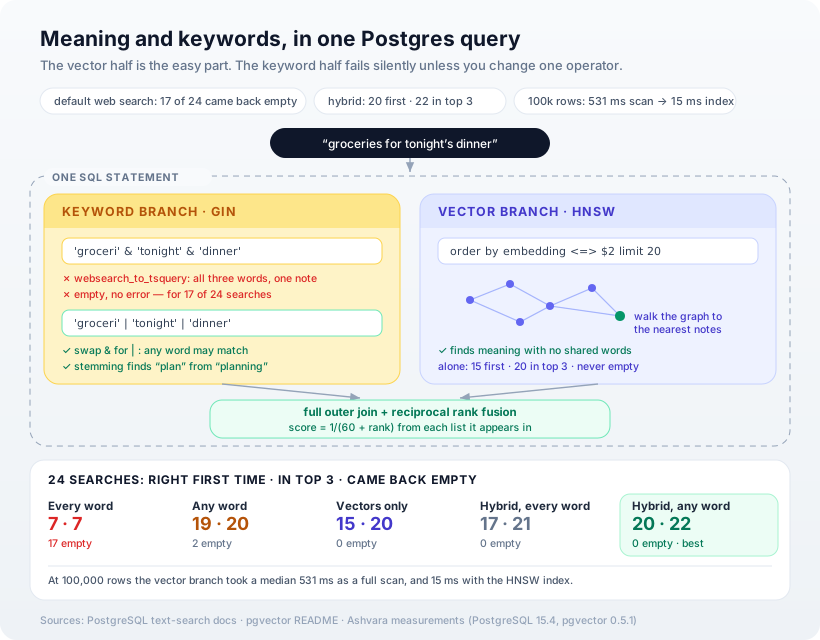
You can search by meaning and by keyword in a single Postgres query, and for most applications you should — but the obvious way to do the keyword half quietly returns nothing for most natural searches. On our test set, Postgres's built-in web-style search came back empty for 17 of 24 queries, without an error or a warning. This post builds the version that works: the schema, the two searches, the one statement that merges them, and what happens to speed when the table grows to 100,000 rows.
The test
This is the server-side twin of our on-device search build, and it uses the same test so the two can be compared directly: 60 personal notes, 24 searches, one known right answer each. Eleven searches share a word with their answer; thirteen deliberately don't.
The vectors come from the same 512-dimension sentence model, stored in Postgres with the pgvector extension. In production you'd generate them with whatever embedding model your stack uses — nothing in the SQL below cares where they came from.
We ran everything on PostgreSQL 15.4 with pgvector 0.5.1, in Docker on an Intel MacBook Pro. That pgvector release is older than current; we note below where that matters.
Step 1: One table, two indexes
create extension if not exists vector;

create table notes (
  id        bigint primary key,
  body      text not null,
  embedding vector(512) not null,
  search    tsvector generated always as
              (to_tsvector('english', body)) stored
);

create index notes_search_idx on notes
  using gin (search);
create index notes_embedding_idx on notes
  using hnsw (embedding vector_cosine_ops);
The search column is generated, so Postgres keeps the keyword index in step with the text automatically — there's no second system to sync, which is most of the argument for not reaching for a separate vector database. The GIN index serves keyword search; the HNSW index serves meaning.
Step 2: Keyword search, and the trap
The natural choice for user-typed searches is websearch_to_tsquery. It's designed for raw input, never throws a syntax error, and handles quotes and minus signs. It's also, for this job, the trap. Postgres's documentation is clear about what it does with ordinary words:
Unquoted text: text not inside quote marks will be converted to terms separated by & operators.
& means AND. Every word in the search has to appear in the note. Someone typing "groceries for tonight's dinner" gets nothing unless a single note contains all of those words. On our 24 searches, this returned no results at all for 17 of them — and an empty result looks exactly like "there's nothing to find", so nobody files a bug.
For finding things, you want notes that match any of the words, ranked by how well they match:
-- $1: the search text
select id, ts_rank_cd(search, q) as rank
from notes,
     to_tsquery('english',
       replace(plainto_tsquery('english', $1)::text,
               '&', '|')) as q
where search @@ q
order by rank desc
limit 20;
plainto_tsquery does the parsing, stemming and stop-word removal; the replace swaps its AND operators for OR (|). That one change took keyword search from 7 right answers to 19 — and from 17 empty results to 2.
Step 3: Vector search
-- $2: the query's embedding
select id, embedding <=> $2 as distance
from notes
order by embedding <=> $2
limit 20;
<=> is pgvector's cosine-distance operator — smaller is closer. On its own this placed the right answer first 15 times and in the top three 20 times, identical to the same model in our on-device build, which is a useful sign the two setups agree.
Step 4: Both rankings, one statement
Keyword ranks and vector distances aren't on the same scale, so you can't add them. Reciprocal rank fusion merges the two lists by position instead: each result scores 1 / (60 + rank) from each list it appears in, and the sum decides the order.
with semantic as (
  select id,
         row_number() over (order by embedding <=> $2)
           as rank
  from notes
  order by embedding <=> $2
  limit 20
),
keyword as (
  select id,
         row_number() over (order by ts_rank_cd(search, q) desc)
           as rank
  from notes,
       to_tsquery('english',
         replace(plainto_tsquery('english', $1)::text,
                 '&', '|')) as q
  where search @@ q
  order by ts_rank_cd(search, q) desc
  limit 20
)
select coalesce(s.id, k.id) as id
from semantic s
full outer join keyword k using (id)
order by coalesce(1.0 / (60 + s.rank), 0)
       + coalesce(1.0 / (60 + k.rank), 0) desc
limit 5;
The full outer join matters: a note found by only one branch still makes the list. Each branch is capped at 20 candidates, so the merge stays cheap however large the table gets.
The results
| Approach | Right first time | In top three | Returned nothing |
|---|---|---|---|
| Keywords, every word must match | 7 / 24 | 7 / 24 | 17 |
| Keywords, any word may match | 19 / 24 | 20 / 24 | 2 |
| Vectors only | 15 / 24 | 20 / 24 | 0 |
| Hybrid, with every-word keywords | 17 / 24 | 21 / 24 | 0 |
| Hybrid, with any-word keywords | 20 / 24 | 22 / 24 | 0 |
The hybrid is best on every measure, and it never comes back empty. It also scored one better than the on-device version of the same idea, because Postgres's keyword side does real stemming — "festival food planning" found "Plan the menu for Diwali", and "my eyes hurt" matched "an eye test" — where our hand-rolled Swift keyword matcher needed exact words.
Two searches defeated every approach: "looking after the houseplants" and "wifi is unreliable". Their answers say "balcony plants" and "broadband", connections a compact model doesn't make and no keyword can. Show five results rather than one, and those near-misses at least stay visible.
The every-word row is worth sitting with. Even inside the hybrid, the AND version costs three first-place answers, because the keyword branch is contributing nothing for most searches and the vector branch is working alone.
What happens at 100,000 rows
Sixty rows tell you nothing about speed, so we built a second table of 100,000 rows with 512-dimension vectors and timed the vector branch both ways.
The difference an index makes is not subtle:
| 100,000 rows, 512 dimensions | Median query time |
|---|---|
| Full scan, no vector index | 531 ms |
| HNSW index, default settings | 15 ms |
Building that index took 322 seconds on this laptop and produced a 260 MB index — a real cost, paid once, and worth planning for before you add one to a busy production table.
An HNSW index is approximate: in pgvector's own words, it "trades some recall for speed." So the second question is how many of the true nearest neighbours it actually finds. For that we embedded 20,000 real texts with the same sentence model and asked for the 10 nearest neighbours of each of our 24 searches, comparing against an exact scan:
hnsw.ef_search | Share of the true 10 nearest found |
|---|---|
| 40 (the default) | 93% |
| 100 | 97% |
| 200 | 98% |
Raising ef_search buys recall with speed. For a hybrid search the default is usually fine: the keyword branch catches much of what the vector branch misses, and each branch only needs to put the right note somewhere in its top 20, not at exactly the right position.
One mistake worth confessing, because it's an easy one to make. Our first recall test used random vectors, and HNSW found only about 5% of the true neighbours. That number says nothing about HNSW: in 512 dimensions, random points sit at almost the same distance from one another, so there are no near neighbours to find. Test an approximate index on vectors from your real model and your real data, or the result is meaningless.
What we measured, and what we didn't
Every SQL block above is the code we ran; the result tables come from executing it against the test set. The caveats: the test set is ours and small, so the numbers are directional. The timings come from a laptop running Postgres in Docker, which is slower than a tuned server. And pgvector 0.5.1 is several releases old — current versions can build HNSW indexes using parallel workers, so the build time is the number most likely to have improved since.
Our opinion
For most applications, Postgres is all the search infrastructure you need, and the hybrid query above is the right default. It's one table, one statement, no second system to keep in sync, and it beat both of its halves.
But the lesson we'd underline isn't about vectors at all. The most damaging result in this post came from the keyword half: a sensible-looking, well-documented function that silently returned nothing for most natural searches. Teams adding AI search often blame the embeddings when results disappoint, when the actual failure is an AND they never noticed. Before you tune a vector index, check what your keyword search does with a five-word query.
How Ashvara helps
We build search into applications as part of the backend, not as a bolt-on service — one database, measured against the searches real users type, with the failure cases found before launch rather than after. It's everyday backend and API work for us, joined to how we approach AI features.
If your search returns nothing more often than it should, tell us what people are typing. It's often one operator.
Sources: PostgreSQL documentation — Controlling Text Search; pgvector README (v0.5.1 and current). Measurements: our own 60-note, 24-query test set, a 100,000-row timing table and 20,000 real embeddings for recall, PostgreSQL 15.4 with pgvector 0.5.1 in Docker on an Intel MacBook Pro.