Supabase, explained simply
What Supabase actually is, what it costs, the one security concept you must understand, and an honest list of when to use it - and when not to.
11 min read
Supabase is a Postgres database with the things you'd otherwise have to build yourself already attached — authentication, file storage, realtime updates, and an API generated straight from your tables. That last part is the whole story: your database is exposed directly to the browser, so there's no backend to write. Which means the only thing standing between one user and everyone else's data is a Postgres feature called Row Level Security. Understand that one trade and Supabase is simple. Miss it and you ship a data breach. This is the complete picture, in plain terms.
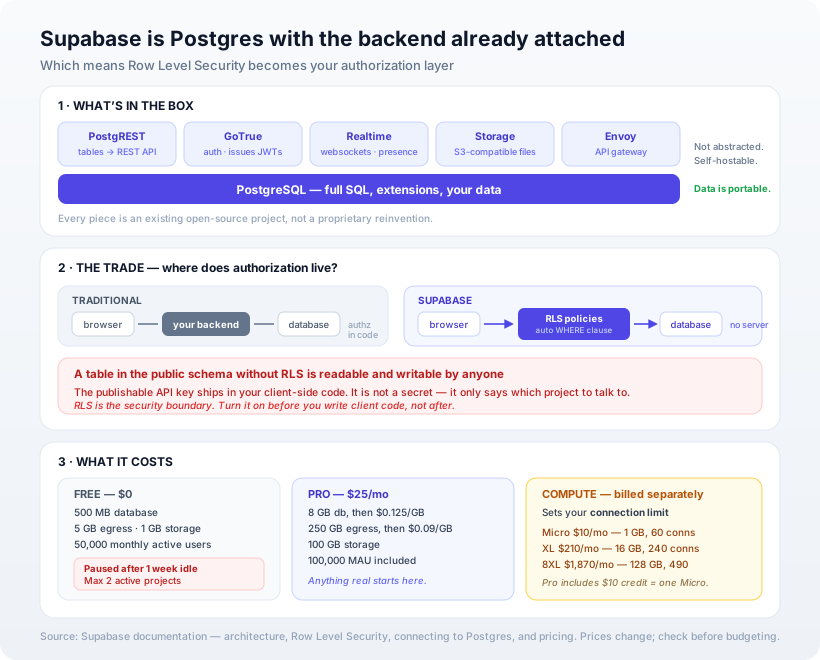
What Supabase actually is
The clearest way to think about it: Supabase is Postgres, plus five services around it, plus a dashboard. From their own architecture docs: "Postgres is the core of Supabase. We do not abstract the Postgres database—you can access it and use it with full privileges."
Each piece is an existing open-source project, not a proprietary reinvention:
| Piece | What it does | Built on |
|---|---|---|
| Database | Your actual data. Real Postgres, full SQL, extensions | PostgreSQL |
| API | Turns every table into a REST endpoint automatically | PostgREST |
| Auth | Sign-up, login, JWTs, social providers | GoTrue |
| Realtime | Live updates over WebSockets, presence, DB change streams | Realtime (Elixir) |
| Storage | File uploads, S3-compatible, metadata stored in Postgres | Storage API |
| Gateway | Routes traffic to all of the above | Envoy |
Two consequences worth holding onto. First, your data is in ordinary Postgres — you can connect psql, run migrations, use extensions, and take a standard dump with you. Second, the whole thing is self-hostable; Supabase states its cloud offering is compatible with the self-hosted product. So the lock-in is real but shallow: leaving means rebuilding auth and storage, not converting your data.
The one thing you must understand: RLS is your backend now
This is the concept that gives everything else meaning, so it's worth being slow about.
In a normal app, the browser talks to your server. Your server checks who the user is, decides what they're allowed to see, and only then queries the database. That authorization check lives in your code.
With Supabase, the browser talks to the database directly. There's no server of yours in the middle. That's why you can ship so fast — and it raises an obvious question: what stops someone opening the browser console and asking for everyone's rows?
The answer is Row Level Security (RLS), a Postgres feature. You write policies, and Postgres silently attaches them as a WHERE clause to every single query. A policy like "you can only read rows where user_id equals your own id" means a request for all rows returns only yours — enforced by the database, not by trust.
Supabase is explicit that this is the deal: "Supabase allows convenient and secure data access from the browser, as long as you enable RLS."
The API key in your client-side JavaScript is public by design. It is not a secret. RLS is the security boundary — the key just says which project to talk to.
So: a table in the public schema with RLS switched off is readable and writable by anyone who views your page source. Not theoretically. Actually. This is the single most common way Supabase projects leak data, and it isn't a flaw in Supabase — it's what happens when people carry over the mental model that "the API key protects me."
Three specific traps the docs call out, all worth knowing before you write your first policy:
- Unauthenticated requests have a null identity. With no access token,
auth.uid()returnsnull, and SQL comparisons againstnulldon't behave the way most people read them. Write your policies with the logged-out case explicitly in mind, and test it. - Don't authorize on user-editable metadata. The docs warn that "not all information present in the JWT should be used in RLS policies." If a user can edit their own metadata, a policy that trusts a
rolefield in it is a privilege-escalation bug with extra steps. - JWTs go stale. Change someone's permissions and the old token keeps its old claims until it refreshes.
What it costs
Real numbers, because the free tier's limits are the ones that surprise people:
| Free | Pro | Team | |
|---|---|---|---|
| Price | $0 | $25/mo | $599/mo |
| Database | 500 MB | 8 GB, then $0.125/GB | 8 GB, then $0.125/GB |
| Egress | 5 GB | 250 GB, then $0.09/GB | 250 GB |
| File storage | 1 GB | 100 GB | 100 GB |
| Monthly active users | 50,000 | 100,000 | 100,000 |
The free-tier catch: projects are paused after one week of inactivity, and you're limited to two active projects. Fine for learning, fatal for a demo you show a client on a Monday after a quiet week. If anything real depends on it, you're on Pro.
Compute is billed separately, and it's the line that determines how many concurrent connections you get — from Micro at $10/month (1 GB RAM, 60 direct connections) up to 8XL at $1,870/month (128 GB RAM, 490 connections). Pro and Team include $10 of compute credit, which covers one Micro.
The honest pros and cons
What's genuinely good:
- Speed to a working product. Auth, storage, realtime and an API that would take weeks to assemble are there on day one. For an MVP this is the strongest argument and it isn't close.
- It's real Postgres. Full SQL, extensions, no query-language dialect to learn, and your data is portable.
- Authorization lives next to the data. Once RLS policies are right, they apply everywhere — you cannot forget the check in one endpoint, because there are no endpoints.
- Open source and self-hostable. A meaningful escape hatch, and rare among backend-as-a-service platforms.
- Realtime is genuinely easy. Live-updating UI is a subscription, not an infrastructure project.
What's genuinely hard:
- RLS is a new skill, and the failure mode is silent. A wrong policy doesn't throw — it returns the wrong rows. You need to test policies as deliberately as you'd test payment code.
- Connections are a real constraint. Postgres connections are expensive and your compute tier caps them. Serverless functions make this worse by opening many short-lived ones.
- The transaction pooler doesn't support prepared statements. If you connect from serverless on port 6543, you must disable prepared statements in your client or you'll get errors that look like driver bugs.
- Complex authorization gets awkward. Rules that are easy in application code — multi-tenant hierarchies, role inheritance, "managers can see their reports' data" — become intricate SQL policies.
- Costs scale on egress and compute, not just rows. A media-heavy app can find bandwidth is the bill.
- Some pieces are less mature than Postgres itself. The database is decades old; the surrounding services are not.
Connections: the part that bites in production
Worth knowing before you deploy, because the symptoms are confusing. Supabase offers three ways in:
- Direct connection (port 5432) — for long-running servers and containers. IPv6 by default; IPv4 needs an add-on.
- Session pooler (port 5432) — behaves like a direct connection but works on IPv4-only networks.
- Transaction pooler (port 6543) — for serverless and edge functions, where thousands of short-lived connections would otherwise exhaust the database. This is the one that doesn't support prepared statements.
The rule of thumb: persistent server → direct or session; serverless → transaction pooler, with prepared statements off. Getting this wrong produces intermittent failures under load, which is the worst kind to debug.
When to use it — and when not to
Use Supabase when:
- You're building an MVP or an internal tool and want to be shipping features this week rather than assembling infrastructure.
- Your authorization rules are reasonably simple — "users see their own data," "team members see their team's data."
- You want Postgres but don't want to run Postgres.
- You need realtime and would rather not stand up a WebSocket layer.
- You're a small team with no dedicated ops person.
Choose something else when:
- Your authorization is genuinely complex. If you're sketching a permission matrix, that logic wants to live in application code, and you may be happier with plain managed Postgres and your own API.
- You're at a scale where connection limits and egress pricing dominate — at that point you're paying platform rates for something you could run yourself.
- You need heavyweight background processing, long-running jobs, or unusual infrastructure. Edge functions have limits; a queue and a worker may serve you better.
- Regulatory constraints demand specific residency or isolation your plan doesn't offer. Self-hosting is the answer, and then you're running it anyway.
Our opinion
Supabase is the best available answer to "I need a backend and I'd rather not build one" — provided you treat RLS as a first-class engineering concern rather than a checkbox. The teams who have a bad time with it are almost never let down by the product; they adopted it for the speed and never internalised that they'd moved their authorization layer into the database and now owned it there.
Our practical advice is unglamorous: turn RLS on for every table before you write a line of client code, not after. Once an app is working, adding policies means finding out which of your queries were quietly relying on unrestricted access, and that is a much worse afternoon.
The counter-case deserves saying. If your product's rules are intricate — cross-organisation sharing, delegated access, approval chains — then expressing them as SQL policies is fighting the tool. Managed Postgres plus a thin API you control will be simpler, and "simpler" is worth more than "faster to start" on anything you'll maintain for years. Supabase is excellent at the common case; it's not a universal replacement for a backend, and it doesn't claim to be.
How Ashvara helps
We build on Supabase when it fits and say so when it doesn't — usually after ten minutes on what your authorization rules actually are, because that answers it. When we do use it, we write and test RLS policies as deliberately as any other security boundary, and we get the connection mode right for how the app is deployed before it's a production incident.
That's core backend and API work for us, and it sits alongside how we think about choosing a database and why Postgres is usually the right default. If you're deciding whether Supabase fits what you're building, tell us what you need it to do and we'll give you a straight answer.
Sources: Supabase documentation — architecture, Row Level Security, connecting to Postgres, and pricing. Plan limits and prices change — check the pricing page before budgeting.