Redis, explained simply
Redis is memory that optionally persists. Out of the box it won't evict anything and can lose minutes of writes in a crash. Here's what to set instead.
10 min read
Redis is not a fast database. It's memory that optionally persists — and the two settings that decide what "optionally" means are ones most teams never touch. On defaults, Redis has no memory limit and will not evict anything, and a crash can lose minutes of writes, not seconds. Neither default is wrong; they're just not the ones people assume. Get those two right and Redis is one of the most useful tools you can put in a stack. This is the whole picture, plainly.
What Redis actually is
Redis describes itself as a data structure server, and that phrase is the key to using it well. Most people meet it as "a cache," which is like meeting Postgres as "a place to put a table" — true, and it leaves most of the value on the floor.
You get real data structures, with the operations you'd expect, stored in memory and accessed over the network:
| Type | What it is | What it's for |
|---|---|---|
| Strings | A sequence of bytes | Cached values, counters, flags |
| Hashes | Field-value pairs | Records — a user, a session |
| Lists | Ordered by insertion | Simple queues, recent-items feeds |
| Sets | Unordered unique strings | Membership. Add, remove and exists are O(1) |
| Sorted sets | Unique strings ordered by a score | Leaderboards, rate limiting, priority queues, time-ordered indexes |
| Streams | Append-only log | Event capture with consumer groups |
| Bitmaps / bitfields | Bit operations on strings | Daily-active flags, compact counters |
| Probabilistic | Bloom filter, HyperLogLog, Top-K | "Have I seen this?" and "roughly how many?" at tiny memory cost |
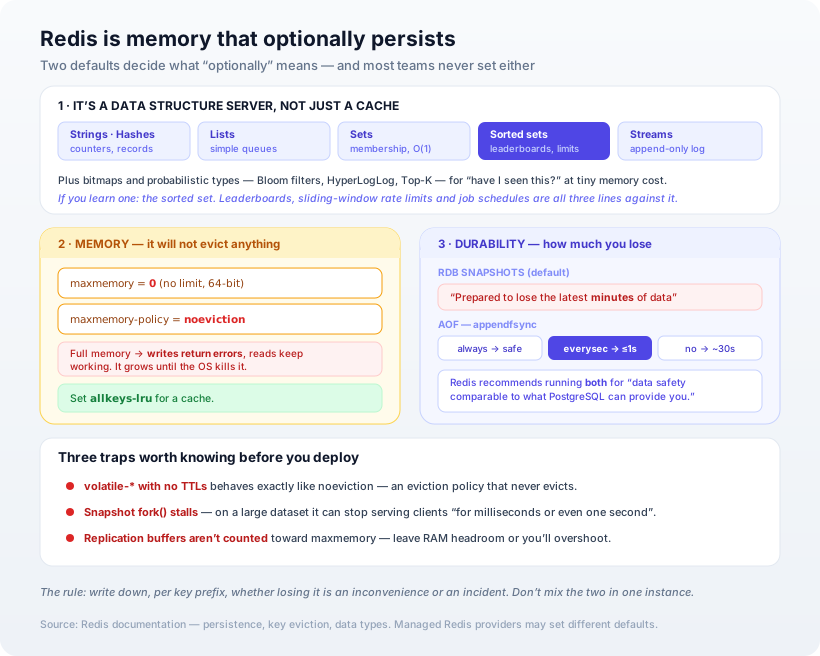
The sorted set is the one worth knowing about if you know nothing else — a huge number of problems that look hard (a leaderboard, a sliding-window rate limiter, a scheduled-jobs index) are three lines against a sorted set.
Default #1: Redis will not evict anything
This is the one that surprises people, because it contradicts the mental model of "Redis is a cache, caches evict."
Two settings control this, and both defaults point the other way:
maxmemorydefaults to0— meaning no limit on 64-bit systems. Redis will keep allocating until the machine runs out and the OS kills the process.maxmemory-policydefaults tonoeviction— when the limit is reached, Redis "will return an error when you try to execute commands that cache new data." Reads keep working. Writes start failing.
So an unconfigured Redis used as a cache doesn't quietly discard old entries. It grows until something kills it, or — if you set a limit but not a policy — it starts erroring on writes while your dashboards look fine.
The policies, once you set one:
allkeys-*— evict from all keys:lru(least recently used),lfu(least frequently used),lrm(least recently modified, new in Redis 8.6), orrandom.volatile-*— the same, but only over keys that have a TTL, plusvolatile-ttl(shortest remaining TTL first).
For a cache, allkeys-lru is the answer unless you have a reason otherwise. Redis recommends it as the default because access patterns usually follow a power law — a small subset gets most of the traffic.
The trap in the
volatile-*policies: they "behave likenoevictionif no keys have an associated expiration." Choosevolatile-lru, forget to set TTLs, and you've configured an eviction policy that never evicts.
Two more details worth having. Redis's LRU is approximate — it samples a few keys at random rather than tracking exact access order, because true LRU costs more memory; you can tune this with maxmemory-samples. And if you use replication or persistence, leave RAM headroom: the buffers holding pending updates aren't counted toward maxmemory.
To check whether your policy is working, INFO stats gives you keyspace_hits and keyspace_misses — hit rate is hits / (hits + misses) — plus evicted_keys and expired_keys. A high eviction count with a poor hit rate means the wrong keys are going.
Default #2: a crash loses minutes, not seconds
The second assumption worth dismantling: "Redis writes to disk, so my data is safe." It does write to disk. How much you lose depends entirely on which mechanism, and the default is the weaker one.
RDB (the default) takes point-in-time snapshots at configured save points — save 60 1000 means "snapshot every 60 seconds if at least 1000 keys changed." Redis's own documentation is refreshingly blunt about the consequence:
Snapshotting is not very durable… you should be prepared to lose the latest minutes of data.
AOF logs every write command and replays it on restart. Its durability is a dial, appendfsync:
always— fsync on every write. "Very very slow, very safe."everysec— the default. You can lose at most one second.no— let the OS decide. On Linux that's roughly every 30 seconds.
And Redis's recommendation, which is the single most useful sentence in that document:
The general indication you should use both persistence methods is if you want a degree of data safety comparable to what PostgreSQL can provide you.
Read that as the honest framing it is: out of the box, Redis is not offering Postgres-grade durability, and it isn't pretending to. With both enabled, AOF is used on restart because it's more complete. RDB stays useful for backups and faster restarts on large datasets.
One operational hazard to know about: snapshots work by fork()-ing the process, and on a large dataset that fork "may result in Redis stopping serving clients for some milliseconds or even for one second." If you have a latency budget, that's where a mysterious periodic spike comes from.
When to use it — and when not to
Redis is the right tool for:
- Caching — the obvious one, and it's excellent at it once eviction is configured.
- Sessions — fast, expiring, and losing them logs people out rather than losing data.
- Rate limiting and counters — atomic increments and sorted sets make this trivial.
- Leaderboards and rankings — sorted sets are purpose-built.
- Simple queues and event streams — lists and streams cover a lot before you need a real broker.
- Ephemeral shared state — anything several processes need to agree on right now.
Reach for something else when:
- The data must not be lost. Redis can be made durable, but if losing a second of writes is unacceptable, a database designed around durability is the honest choice.
- Your working set doesn't fit in RAM. Redis holds everything in memory. Once your data exceeds it, you're paying for RAM you can't fill or evicting things you needed.
- You need queries. There's no query planner and no ad-hoc access — you can only retrieve what you designed a key for. (The same constraint we described for DynamoDB, for the same underlying reason.)
- You need guaranteed delivery. Streams with consumer groups are good, but a dedicated broker with durable acknowledgements is better when a lost message means a lost order.
The settings to actually set
If you take one thing from this, take this list. On any Redis you deploy:
- Set
maxmemoryto something below the machine's RAM, leaving headroom for replication and persistence buffers. - Set
maxmemory-policyexplicitly.allkeys-lrufor a cache;noevictiononly if you genuinely want writes to fail rather than lose data. - Decide your durability out loud. Pure cache: persistence off is fine and fastest. Anything you'd miss: AOF with
everysec, and RDB alongside it for backups. - If you chose a
volatile-*policy, verify your keys actually have TTLs. Otherwise it'snoevictionwearing a disguise. - Watch
keyspace_hits,evicted_keys, andused_memory. A cache without a hit-rate metric is a cache nobody knows is working. - Set TTLs on cache keys anyway. Expiry is cheaper than eviction, and keys that expire never reach the limit.
Our opinion
The most common Redis mistake isn't a wrong data structure — it's using it as a database by accident. It starts as a cache, then someone stores a queue in it, then a piece of state that isn't written anywhere else, and now an instance configured for cache semantics is the only copy of something that matters. Nobody decided that; it accumulated.
Our practical rule: write down, per key prefix, whether losing it is an inconvenience or an incident. If everything in an instance is an inconvenience, run it as a pure cache with allkeys-lru and no persistence, and enjoy the speed. If anything in there is an incident, either move that thing to a real database or run a second instance configured for durability. Mixing the two in one instance means you get the durability of the weakest setting and the cost of the strongest.
We'd also gently push back on reaching for Redis too early. A cache is a second source of truth, and now you own invalidation — which is genuinely hard and produces bugs that only appear under load. Postgres will serve a well-indexed query in single-digit milliseconds, and does more than most teams expect. Add Redis when you've measured a bottleneck, not because it's in the reference architecture.
How Ashvara helps
We treat cache configuration as part of the design rather than an afterthought — memory limits and eviction policy set deliberately, durability chosen against what the data is actually worth, and the metrics wired up so you can tell whether the cache is earning its place.
That's core backend and API work for us, and it sits alongside how we think about choosing a database generally. If you're adding Redis, or you've inherited one nobody configured, tell us what it's holding and we'll help you set it up so a restart isn't an incident.
Sources: Redis documentation — persistence, key eviction, and data types. Defaults differ in managed Redis offerings — check your provider's configuration.